
Table of Contents
- Why Graphic Tee Prints Crack: Print Types and Failure Points
- How to Wash Screen Printed Shirts Without Damaging the Design
- The Right Way to Dry: Air Dry vs. Tumble Dry
- Detergent, Bleach, and Fabric Softener: What to Use and Avoid
- Machine Settings Beyond Temperature: Spin Speed and Load Size
- How to Fix Cracked T-Shirt Print That's Already Damaged
- Frequently Asked Questions
Last Updated: September 13, 2026
Why Graphic Tee Prints Crack: Print Types and Failure Points
Learning how to prevent graphic tee prints from cracking starts with understanding that not all prints fail the same way. Plastisol screen prints, direct-to-garment prints, and heat transfer vinyl each break down differently, which is why one shirt survives fifty washes while another cracks in five.
Plastisol ink is a PVC-based ink cured under high heat that sits on top of the fabric. It's durable, but the cured film is rigid: when cotton stretches in a wash cycle, the ink can't stretch with it, so it fractures along stress lines. Direct-to-garment (DTG) jets water-based ink into the fibers and bonds it with a pre-treatment solution. DTG prints feel softer but are more vulnerable to moisture and abrasion, fading and cracking faster than screen prints. Heat transfer vinyl (HTV) is a cut film pressed on with an adhesive layer; it peels at the edges first, then cracks as the adhesive degrades.
The failure points are consistent across all three:
- Mechanical stress from friction and agitation in the wash drum
- Thermal degradation from high dryer heat breaking down the ink binder
- Chemical attack from bleach and fabric softener
- Ink curing problems at the manufacturer level, which no amount of careful washing can reverse
Here's the part most guides skip: an under-cured print will crack regardless of how you wash it. That's a manufacturing defect, not a care issue. At Grave Humor, every design is printed to order, so treat the care label as a starting point rather than the final word.
How to Identify Your Print Type
Identifying your print type takes ten seconds and tells you how careful you need to be.
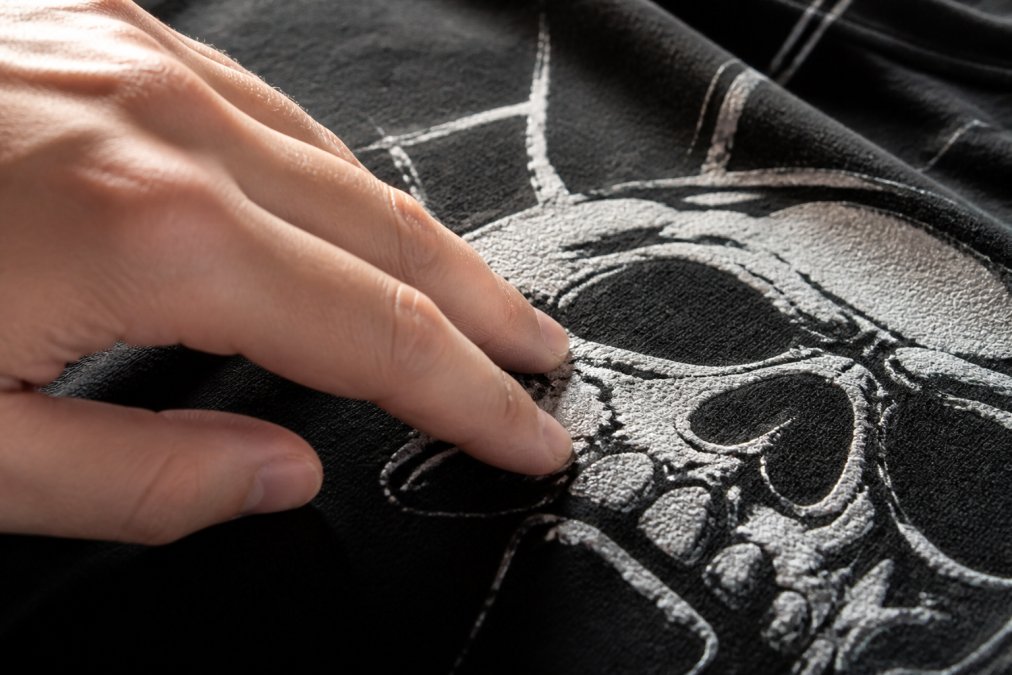
- Screen print (plastisol): A raised, rubbery layer on top of the fabric, with opaque color and crisp edges. Inside the shirt, you may see a faint ghost of the design where ink pushed through the weave.
- DTG: Thin and soft, almost like part of the fabric. Colors may look slightly muted or vintage, with no raised texture.
- Heat transfer vinyl: Often a clear plastic film edge visible under raking light, a slight sheen, and a smooth rather than inked surface.
How to Wash Screen Printed Shirts Without Damaging the Design
The short answer to how to wash screen printed shirts is: cold water, inside out, gentle cycle, and never with a full load of heavy items. Heat and friction kill prints, and both are easy to control. Follow this sequence:
- Turn the shirt inside out and fasten buttons or zippers on other garments in the load.
- Set the machine to a cold water cycle. Cold water keeps the ink binder from softening and re-flowing, a leading cause of cracking and fading.
- Choose a delicate or gentle cycle to reduce agitation and spin speed.
- Use a mild liquid detergent and skip anything with bleach or fabric softener.
- Wash graphic tees in a small, similar-weight load. A load stuffed with denim and towels creates friction that abrades the print.
- Remove the shirt promptly when the cycle ends to prevent mildew and set-in wrinkles.
A dedicated delicates load takes the same time as everyday laundry and dramatically extends print life.
The Right Way to Dry: Air Dry vs. Tumble Dry
Air drying is the single most effective habit for preventing print cracking, and it costs nothing. The heat inside a tumble dryer softens the ink binder and the adhesive layer on HTV prints, then the tumbling action pulls and flexes the softened print until it fractures. Industry guidance from Cobra DTF's garment care guide recommends skipping the dryer entirely to prevent heat-induced binder breakdown. That advice applies across print types, but the mechanism differs by print, and knowing which one you own changes how much risk a single dryer cycle carries.
What heat actually does to each print type:
- Plastisol screen print: The cured PVC film's glass transition temperature, where it shifts from rigid to rubbery, sits well below peak dryer-drum temperatures. Once it softens, the cotton beneath stretches and contracts with each tumble, and the ink can't recover its shape. Cracks form along fold lines first.
- DTG (water-based ink): Softer and more flexible, these tolerate a low-heat cycle better than plastisol. The bigger threat is abrasion, the damp print rubbing against the drum wall and other garments.
- HTV (heat transfer vinyl): The most heat-sensitive of the three. Heat reactivates the adhesive that bonds the film to the fabric, and tumbling peels the film at the edges before it cracks across the face.
If you must use a machine, work the settings, not just the temperature:
- Choose the lowest heat setting your dryer offers, usually labeled 'delicate,' 'low,' or 'tumble press.'
- Use the moisture-sensor setting instead of a timed cycle if your dryer has one. Sensor drying stops when the load reaches the target dryness, preventing the over-drying that bakes prints.
- Pull shirts while still slightly damp and finish them on a rack. The last few minutes of a cycle are the hottest and do the most cumulative damage.
- Skip dryer sheets entirely. They deposit the same waxy softener film as liquid fabric softener, and that film sits between the ink and the fabric.
- Dry graphic tees in a separate small load so they aren't tumbling against denim, towels, or anything with hardware.
Line drying and flat drying both work. Direct sun can fade ink, so dry graphic tees inside out or in shade. Flat drying avoids shoulder stretch from hanging a wet, heavy shirt by the collar, and a mesh rack dries faster than a line because air moves through both sides.
| Drying Method | Heat Exposure | Mechanical Stress | Print Risk | Best For |
|---|---|---|---|---|
| Line dry (shade) | None | Minimal | Lowest | All print types |
| Flat dry on rack | None | Minimal | Lowest | Heavyweight cotton, HTV |
| Tumble dry low + sensor | Low | Moderate | Moderate | Occasional use, DTG |
| Tumble dry low + timed | Low | Moderate | Moderate-High | Avoid for HTV |
| Tumble dry high | High | High | Highest | Avoid entirely |
Detergent, Bleach, and Fabric Softener: What to Use and Avoid
Detergent choice matters more than most people realize, because some additives actively attack the ink binder. Bleach and fabric softener are the worst offenders, and understanding the chemistry makes it easier to spot other products that cause the same damage.
Bleach. Chlorine bleach is an oxidizer (the EPA). It reacts with the double bonds in the pigment molecules that give plastisol ink its color, breaking those bonds and leaving the pigment unable to absorb and reflect light the way it did when new. The result is fading that looks like sun damage. Oxygen-based bleach (often labeled 'color-safe') is gentler on fabric dyes but still generates reactive oxygen species that can attack the plasticizer in plastisol, making the cured film more brittle over repeated exposure. Industry guidance from AWDIS's print care guidance advises against both bleach and fabric softener specifically because they break down ink binders.
Fabric softener. Liquid softener deposits a layer of cationic surfactant and fatty compounds onto fibers, which makes cotton feel slippery. On a graphic tee, that film works between the cured ink and the fabric surface: adhesion drops and the print lifts at the edges, the first stage of cracking. Dryer sheets use the same chemistry in a meltable coating, causing the same problem from the other end of the cycle.
Enzymes. Proteases, amylases, and lipases break down protein, starch, and fat stains, but some proteases can cleave peptide bonds in the protein-based thickeners and binders used in certain water-based and DTG inks. Over many washes, that shows as gradual softening and dulling rather than a sudden crack.
Optical brighteners. These fluorescent compounds absorb UV light and re-emit it as blue-white light, which is why treated whites look brighter. On a printed shirt, they can shift the ink's perceived color and leave a chalky residue.
What to look for instead:
- Liquid over powder. Powder detergents can leave undissolved granules that abrade prints in a cold cycle, and they're harder to dissolve in the short cycles graphic tees should use.
- pH-neutral or mildly alkaline formulas. Highly alkaline detergents (pH above roughly 10) degrade water-based DTG inks faster than neutral ones.
- Free of optical brighteners. Look for 'free of dyes and perfumes' or 'free and clear' labeling.
- No fabric softener, no dryer sheets, no scent boosters. Scent boosters are concentrated softener chemistry in bead form and cause the same adhesion loss.
- A dedicated detergent for technical or dark garments if you want to be thorough. These are formulated without the additives that attack prints.
A simple rule: if a detergent promises to brighten, whiten, soften, or add long-lasting scent, don't use it on a graphic tee. A basic free-and-clear liquid does everything a printed shirt needs.
Machine Settings Beyond Temperature: Spin Speed and Load Size
Temperature gets all the attention, but spin speed and load size do just as much damage. A high spin forces water through the fabric and flexes the print against the drum wall thousands of times per cycle. Set spin speed to low or medium, on most front-loaders, "delicate" or "hand wash." If your machine only offers a fixed high spin, choose a shorter cycle.
Load size follows the same logic. An overloaded drum grinds prints together; an underloaded one lets shirts slap the drum wall during spin. Aim for a load that fills roughly two-thirds of the drum, and keep graphic tees away from jeans, towels, and blankets.
One more setting worth checking: extra rinse. It adds a cycle but removes detergent residue that can stiffen prints over time. If your machine has it, use it on graphic tees.
How to Fix Cracked T-Shirt Print That's Already Damaged
Learning how to fix cracked t-shirt print damage is possible, but cracking can't be fully reversed, cured ink that has fractured won't re-bond to itself. What you can do is stop the damage spreading and make the crack less visible. First, stop the cause: switch to cold water, air drying, and a mild detergent immediately.
For minor surface cracks, a few approaches help:
- Iron on low heat from the inside. Turn the shirt inside out and press with a low-heat iron for a few seconds. This can soften the ink slightly and reduce the visibility of fine cracks. Never iron directly on the print.
- Use a pressing cloth. If you must iron the front, place a cotton cloth over the design and keep the iron moving.
- Consider a heat press or professional re-press. A commercial heat press at the correct temperature and pressure can sometimes re-fuse plastisol ink. This is a repair shop job, not a home fix.
Social media tutorials sometimes suggest dabbing acetone onto cracked prints to "melt" the ink back together. Treat that with skepticism: acetone can strip color from the fabric and alter the ink chemistry unpredictably, turning a small crack into a permanent stain.
For prints that are peeling rather than cracking, the fix is different. Peeling usually means the adhesive layer failed, often from dryer heat. A heat press can re-adhere HTV, but a home iron rarely generates enough consistent pressure.
Print cracking is solvable, but it requires treating graphic tees differently from the rest of your laundry. Cold water, inside-out washing, low spin, mild detergent, and air drying cover the vast majority of cases, and none take extra time once they're habits. When you buy a shirt from Grave Humor, you're getting original artwork printed to order in the USA on garments built to hold up, and our veteran-owned team stands behind every design. Browse the collection or commission a custom piece so you can wear it with confidence for years.
Frequently Asked Questions
Why do graphic tee prints crack over time?
Prints crack because the ink binder breaks down. Heat from dryers and irons causes thermal degradation, while friction and agitation during washing create mechanical stress on the cured ink layer. Bleach and fabric softener also attack the binder chemically. Plastisol ink, common in screen printing, is durable but not indestructible. Once the binder loses flexibility, the print surface splits along stress lines. Cold water, air drying, and skipping softener all slow that breakdown significantly.
Can you fix a graphic tee print that has already started cracking?
You can slow further cracking, but you cannot fully reverse existing damage. Acetone dabbing, sometimes suggested in social media tutorials, risks damaging the fabric or altering ink chemistry. A safer approach: stop using the dryer immediately, wash inside out in cold water, and air dry flat. For minor cracks, some people use a thin layer of fabric medium or a heat press on low, but results vary by print type. Prevention from the start is far more reliable than repair.
Is it better to wash graphic tees inside out?
Yes. Turning the shirt inside out puts the fabric between the print and the wash drum, reducing direct friction and agitation on the ink. This simple step protects the print surface from rubbing against other garments and the machine walls. Combined with a cold water cycle and a gentle detergent, washing inside out extends the life of screen printed, direct-to-garment, and heat transfer vinyl designs alike.
What is the best detergent for preserving screen-printed shirts?
Use a mild, liquid detergent free of bleach and fabric softener. Bleach and softener both break down ink binders, which leads to cracking and peeling. Powder detergents can leave residue that stiffens the print area. A gentle liquid formula designed for colors works well. Skip dryer sheets too, since they coat fibers and can interfere with the print's flexibility over time. Less product, not more, is usually the right call.